编写 Python 脚本#
Iphone 手机拍摄的动态图是 livp 格式的文件,在电脑上无法浏览。但实质上 livp 文件是个压缩包,解压后包含照片和视频文件。图片和视频都是常规格式,提取出来保存,方便随时浏览。
前段时间出去玩拍了不少动态图,逐个手动解压提取太费时间,于是打算用 Python 脚本来批量操作。但本人入门级的 Python 编程水平,写这么个脚本估计耗时至少 3 个小时。好在有 DeepSeek 帮忙,5 分钟就把脚本写好,一次性测试成功。
首先把脚本的功能需求写成提示词发给 DeepSeek-R1。
1
2
3
4
5
| 请用Python写一个脚本,在终端中执行。功能包含:
- 提取功能:能够将livp格式的文件解压缩,然后提取其中的图像文件和视频文件;
- 批量操作:能够对当前工作目录中全部的livp格式的文件进行批量提取;
- 文件分类:将批量提取到的图象文件和视频文件分别存放在当前目录中的子目录"photo"、"video"中;
- 统计功能:批量操作完成后显示一共处理的livp文件数量。
|
思考 1 分钟后,DeepSeek 返回了代码。代码放在文章最后,这里先说怎么用。
执行提取操作#
新建一个 py 格式脚本文件,文件名随便取,用文本编辑器打开文件,把代码拷贝进去,保存,关闭。
然后将存放 livp 文件的目录作为当前工作目录,打开终端,进入 Python 运行环境,执行脚本文件。如果脚本文件没有存放在当前目录中,执行时需要给到完整的绝对路径。
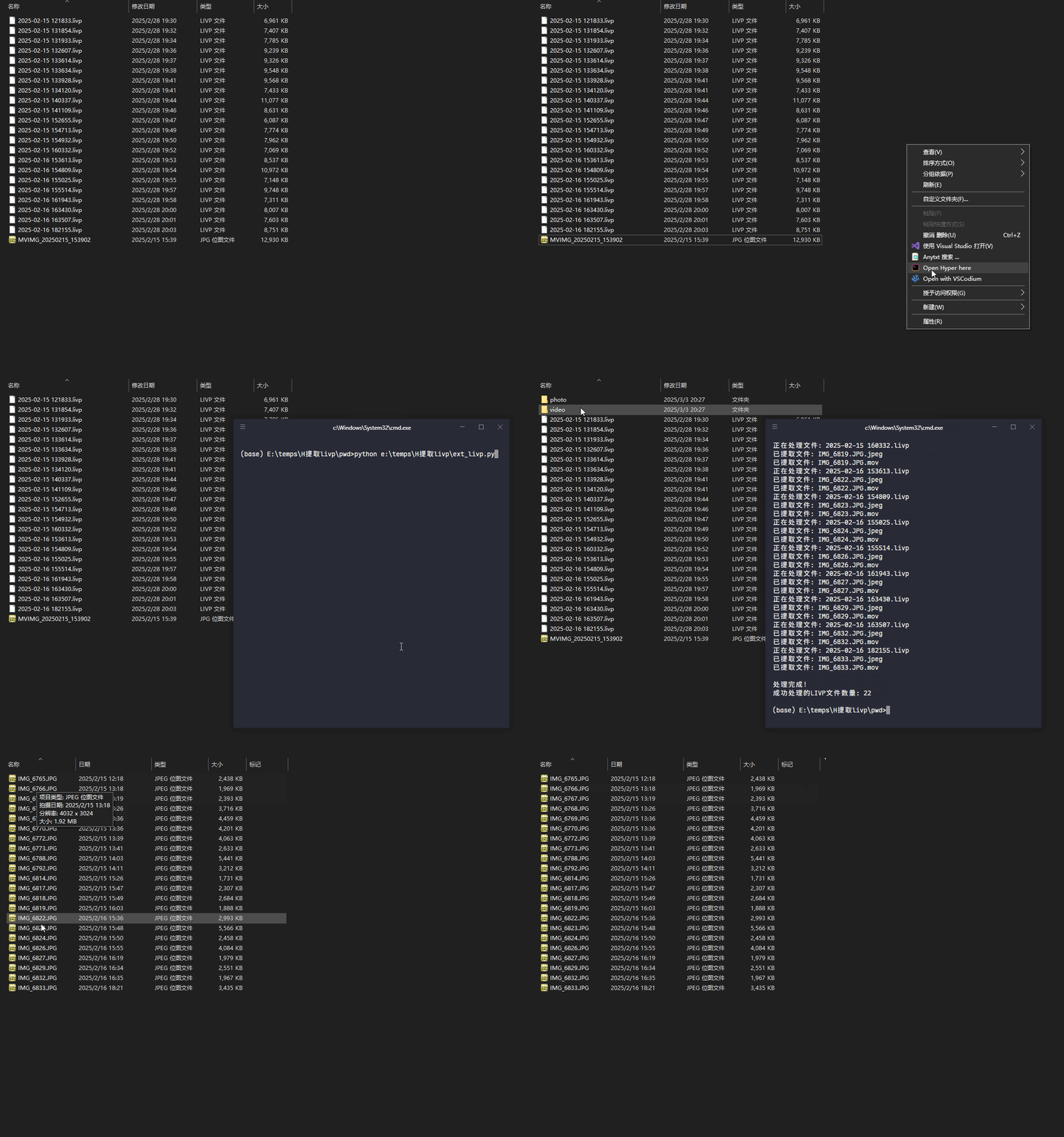
等待脚本执行完毕,会显示处理的 livp 文件数量,在当前目录中会出现两个新的子目录 photo 和 video。Photo 里存放提取出来的图片,video 则是视频。
脚本执行示例:
脚本代码#
Python 脚本代码#
 1
 2
 3
 4
 5
 6
 7
 8
 9
10
11
12
13
14
15
16
17
18
19
20
21
22
23
24
25
26
27
28
29
30
31
32
33
34
35
36
37
38
39
40
41
42
43
44
45
46
47
48
49
50
51
52
53
54
55
56
57
58
59
60
61
62
63
64
65
66
67
68
69
70
71
72
73
74
75
| import os
import zipfile
import shutil
from tempfile import TemporaryDirectory
def process_livp_files():
# 创建目标目录
photo_dir = os.path.join(os.getcwd(), 'photo')
video_dir = os.path.join(os.getcwd(), 'video')
os.makedirs(photo_dir, exist_ok=True)
os.makedirs(video_dir, exist_ok=True)
# 定义文件类型分类
image_exts = {'.jpg', '.jpeg', '.heic', '.png', '.tiff'}
video_exts = {'.mov', '.mp4', '.avi', '.mkv', '.quicktime'}
processed_count = 0
# 遍历当前目录所有文件
for filename in os.listdir('.'):
if not filename.lower().endswith('.livp'):
continue
processed_count += 1
print(f"正在处理文件: {filename}")
try:
with TemporaryDirectory() as temp_dir:
# 解压LIVP文件
with zipfile.ZipFile(filename, 'r') as zip_ref:
zip_ref.extractall(temp_dir)
# 遍历解压后的文件
for root, _, files in os.walk(temp_dir):
for file in files:
src_path = os.path.join(root, file)
ext = os.path.splitext(file)[1].lower()
# 确定目标目录
if ext in image_exts:
dest_dir = photo_dir
elif ext in video_exts:
dest_dir = video_dir
else:
continue
# 处理文件名冲突
base_name = os.path.basename(file)
dest_path = os.path.join(dest_dir, base_name)
counter = 1
while os.path.exists(dest_path):
name_part, ext_part = os.path.splitext(base_name)
dest_path = os.path.join(
dest_dir,
f"{name_part}_{counter}{ext_part}"
)
counter += 1
# 移动文件
shutil.move(src_path, dest_path)
print(f"已提取文件: {os.path.basename(dest_path)}")
except zipfile.BadZipFile:
print(f"警告: {filename} 不是有效的ZIP文件,已跳过")
processed_count -= 1
except Exception as e:
print(f"处理 {filename} 时发生错误: {str(e)}")
processed_count -= 1
# 输出统计结果
print("\n处理完成!")
print(f"成功处理的LIVP文件数量: {processed_count}")
if __name__ == "__main__":
process_livp_files()
|
脚本功能说明#
- 自动分类存储:
- 创建
photo目录存放图片文件(支持JPG/JPEG/HEIC/PNG/TIFF) - 创建
video目录存放视频文件(支持MOV/MP4/AVI/MKV/QUICKTIME)
- 智能重命名:
- 遇到同名文件时自动添加数字后缀(例如:image_1.jpg)
- 错误处理:
- 自动跳过无效的ZIP文件
- 捕获并显示处理过程中的异常信息
- 处理反馈:
脚本使用注意事项#
- 需要Python 3.6+环境;
- 确保有足够的存储空间存放解压后的文件;
- 原始LIVP文件不会被修改或删除;
- 支持处理包含多个媒体文件的LIVP文件;
- 不支持递归处理子目录中的LIVP文件;
- 不处理文件名包含特殊字符的情况(需手动处理)。